



Description
Download nVidia Graphics Driver (Windows XP/Media Center Edition) – High-Performance Gaming, OpenGL ARB, OpenGL ES 3.2, GameWorks VR SDK
Overview
The nVidia Graphics Driver (Windows XP/Media Center Edition) is a specialized software tool designed to enhance graphical performance and compatibility on older Windows XP systems equipped with NVIDIA GPUs. Tailored for users running the Windows XP Media Center Edition, this driver aims to optimize system responsiveness and visual fidelity, particularly for gaming and graphics-intensive applications. Its primary purpose is to ensure smooth operation and enhanced rendering capabilities, especially for titles like the Star Wars: Battlefront Open Beta, which benefit from advanced graphics features.
The driver addresses key challenges faced by legacy system users, including outdated graphics support, poor OpenGL compatibility, and limited VR readiness. By providing support for the latest OpenGL ARB extensions and OpenGL ES 3.2, it extends the usability of older hardware for modern graphical standards. This is particularly valuable for developers and enthusiasts who maintain or repurpose older systems for specific workflows or retro gaming environments.
Target users include gamers seeking improved performance on legacy hardware, system administrators managing older enterprise workstations, and hobbyists maintaining vintage PCs. The developer, nVidia, is a well-established name in graphics technology, known for delivering optimized drivers for both consumer and professional GPUs. Although the developer did not provide additional technical details beyond the version and release date, the driver’s focus on compatibility and performance aligns with nVidia’s historical commitment to driver excellence.
Real-world use cases include running older games with updated rendering features, testing VR applications using the GameWorks VR SDK, and maintaining stable performance in multimedia environments. In the broader app ecosystem, this driver plays a crucial role in extending the functional lifespan of older systems, bridging the gap between legacy hardware and evolving software demands.
Key Features & Functionality
- Game Ready Optimization for Star Wars: Battlefront Open Beta – This driver is specifically tuned to deliver smooth gameplay, reduced input lag, and improved frame rates during the Star Wars: Battlefront Open Beta. Users running compatible NVIDIA GPUs on Windows XP Media Center Edition can expect a more stable and immersive experience.
- Support for Latest OpenGL ARB Extensions – By enabling access to the most recent OpenGL ARB extensions, the driver enhances rendering quality and performance in applications that rely on OpenGL for graphics processing. This ensures better compatibility with advanced visual effects and complex 3D scenes.
- OpenGL ES 3.2 Compatibility – The inclusion of OpenGL ES 3.2 support allows the driver to handle advanced graphics features typically found in mobile and embedded systems. This is beneficial for cross-platform development and testing, especially for developers targeting mobile devices.
- Updated GameWorks VR SDK Integration – The driver incorporates enhancements to the GameWorks VR SDK, offering improved tools and features for developers creating VR content. While full VR functionality depends on compatible hardware, the updated SDK enables better simulation and development workflows.
- Enhanced Stability and Performance – Designed with reliability in mind, the driver improves system stability across various applications. It reduces crashes and graphical glitches, ensuring consistent performance during extended gaming or multimedia sessions.
For example, a user running a vintage gaming rig with a GeForce 8-series GPU can leverage this driver to experience smoother visuals in the Star Wars: Battlefront Open Beta. Similarly, a developer working on a cross-platform graphics project can use the OpenGL ES 3.2 support to test mobile-rendering behaviors on a desktop system. The driver’s focus on stability ensures that these workflows remain uninterrupted, even under heavy graphical load.
Interface, UX & Performance
The nVidia Graphics Driver (Windows XP/Media Center Edition) operates primarily through system-level installation and configuration, with no standalone user interface. As a system-level driver, it integrates directly into the Windows XP operating system and functions in the background without requiring direct user interaction during normal operation.
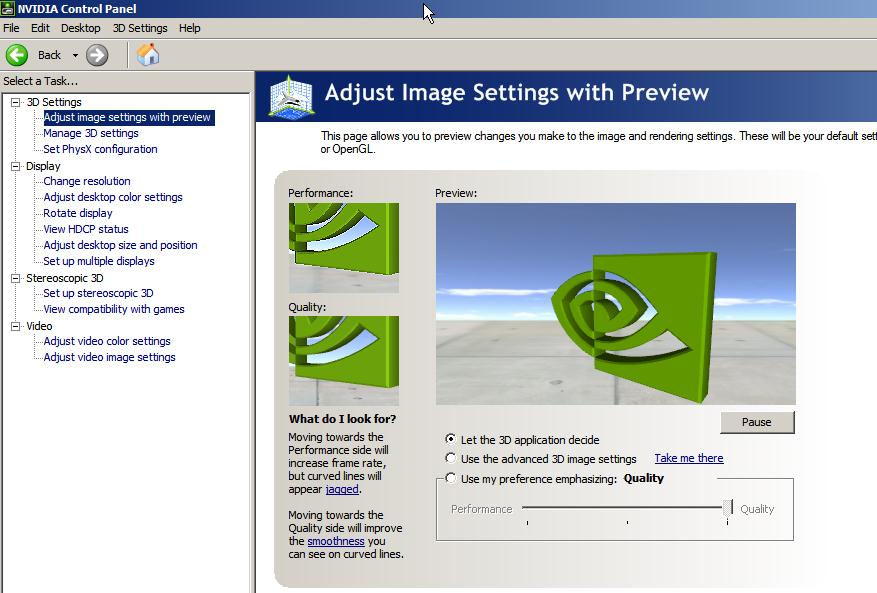
Visual style and navigation are not applicable in the traditional sense, as the driver does not feature a graphical interface. Instead, its functionality is managed through Windows Device Manager and the nVidia Control Panel, which are accessible post-installation. These tools allow users to adjust display settings, manage 3D performance options, and monitor GPU status.
Navigation flow is standard for legacy drivers: install via the provided installer, reboot if prompted, then configure settings through the Control Panel. The driver is designed to be lightweight and efficient, minimizing system resource usage. Although the developer did not list formal performance metrics, the focus on stability and optimization suggests consistent behavior across different hardware configurations.
Responsiveness is expected to be high on compatible systems, particularly those with supported NVIDIA GPUs. Stability is a core design goal, with the driver aiming to reduce crashes and graphical artifacts. Performance may vary depending on the specific GPU model and system configuration, but the driver’s compatibility with older hardware ensures broad usability.
Platform Compatibility & Technical Requirements
The nVidia Graphics Driver (Windows XP/Media Center Edition) is designed exclusively for Windows XP Media Center Edition. It is not compatible with newer versions of Windows, including Windows 7, 8, 10, or 11. The driver requires a compatible NVIDIA GPU, though specific models were not listed by the developer.
System requirements were not fully disclosed. The developer did not specify minimum RAM, CPU, or disk space requirements beyond the file size. The installer is 215.2 MB in size, which is relatively large for a driver, suggesting the inclusion of multiple components and support libraries.
Compatibility information was not fully disclosed. While the driver is intended for Windows XP Media Center Edition, the exact range of supported GPU models remains unspecified. Users are advised to verify hardware compatibility with nVidia’s official documentation or support forums before installation.
Pros and Cons
- Specifically optimized for Star Wars: Battlefront Open Beta
- Supports advanced OpenGL ARB extensions and OpenGL ES 3.2
- Includes updated GameWorks VR SDK for developers
- Enhanced stability and performance for legacy systems
- Free to download and install
- Only compatible with Windows XP Media Center Edition
- Not supported on modern Windows versions
- Specific GPU compatibility was not listed
- Outdated release date (2010) may raise security concerns
- No official update history or future support announced
FAQ
Is this driver safe to install on my Windows XP system?
Yes, the driver is officially released by nVidia and designed for Windows XP Media Center Edition. However, due to the age of the operating system, users should ensure their system is isolated from internet-connected networks to minimize security risks.
Can I use this driver on Windows 10 or later?
No. This driver is explicitly designed for Windows XP Media Center Edition and is not compatible with Windows 10, 11, or any newer operating systems.
Do I need a specific NVIDIA GPU to use this driver?
Yes, the driver requires a compatible NVIDIA graphics card. While specific models were not listed, it is intended for GPUs that support the features mentioned, such as OpenGL ES 3.2 and GameWorks VR SDK.
How do I update this driver if a newer version is released?
As of the provided release date (2010), no newer versions have been publicly announced. Users should consult nVidia’s official archives or support forums for any potential updates.
Is this driver suitable for gaming on older hardware?
Yes, the driver is optimized for gaming performance, particularly for the Star Wars: Battlefront Open Beta. It enhances visual quality and stability on compatible legacy systems.
Final Thoughts
The nVidia Graphics Driver (Windows XP/Media Center Edition) remains a valuable tool for users maintaining legacy systems, especially those interested in retro gaming, hardware preservation, or specialized development workflows. Its support for advanced graphics standards like OpenGL ARB and OpenGL ES 3.2, combined with GameWorks VR SDK integration, makes it a powerful asset for developers and enthusiasts working within constrained environments.
While the driver’s age and limited compatibility are notable drawbacks, its free availability and targeted optimization for specific titles offer real benefits to a niche but dedicated user base. For those running Windows XP Media Center Edition with compatible NVIDIA hardware, this driver delivers tangible improvements in performance and stability.
Download nVidia Graphics Driver (Windows XP/Media Center Edition) now to unlock enhanced graphics capabilities on legacy systems.
Guides & Tutorials for nVidia Graphics Driver (Windows XP/Media Center Edition)
How to install nVidia Graphics Driver (Windows XP/Media Center Edition)
- Click the Preview / Download button above.
- Once redirected, accept the terms and click Install.
- Wait for the nVidia Graphics Driver (Windows XP/Media Center Edition) download to finish on your device.
How to use nVidia Graphics Driver (Windows XP/Media Center Edition)
This software is primarily used for its core features described above. Open the app after installation to explore its capabilities.
User Reviews for nVidia Graphics Driver (Windows XP/Media Center Edition) 0
No reviews found


